- When a script is opened in Controller, run-time settings also gets copied from VUGen to controller. Check out components of LoadRunner.
- Any changes done in the script and run-time settings are not reflected in the controller unless you refresh them.
- Refresh in controller can be done by going to Design > {Highlighting scenario group} that are using script in question > Clicking Details button > Clicking the REFRESH button on the Group Information pop-up window. So next time when controller asks you to load new script iteration settings do the refresh.
- While doing Save As:
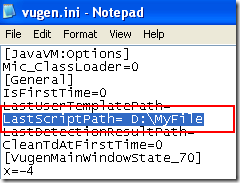
- Default directory in VUGen can be changed by going to vugen.ini file located under C:\Program Files\HP\LoadRunner\config and appending the required file path to LastScriptPath (as shown on the right).
- Default directory in Controller can be changed by going to wlrun.ini file located under C:\Program Files\HP\LoadRunner\config and appending the required file path to M_ROOT
- Note that THINK time is ignored in VUGen while played back as recorded in Controller.



controller
Points to note with VuGen and Controller
Recent Posts


October 14, 2011
By Ankur Jain







Grab My Banner

Subscribe


© 2016 Learn LoadRunner.
All Rights Reserved.
An  initiative
initiative