


URL vs HTML recording mode

Sponsored Links

Filed under: introduction 

There are three types of recording mode/levels in LoadRunner. GUI-based, HTML based and URL based. For the uninitiated, recording levels tells you the amount of and what information is recorded during the recording process. As the title says, for this post we will keep focus on HTML based and URL based recording levels only and will touch upon GUI based mode, in a later post.
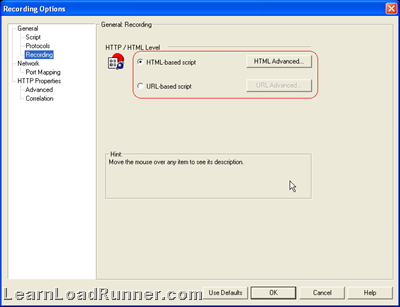
URL vs HTML

  1. HTML based mode, records script for every user action that is performed during recording (hmmm…sounds like QTP) while URL based mode records each and every browser request to the server and resources received from the server. Confused? ok, HTML based mode does recording as you perform clicks and doesn’t give you inside information like what is happening behind the recording while URL based mode records each and every step and emulate Javascript code.
  2. From the point1) above you can guess, HTML mode would have less correlation to do while URL mode has much more complex correlation requirements.
  3. HTML mode is smaller and is more intuitive to read as the statements are inside the functions corresponding to the user action performed. In the case of URL based, all statements gets recorded into web_url()
  4. HTML mode is recommended for browser applications while URL mode is recommended for non-browser applications.
  5. Lastly, don’t get the impression that I am advocating for HTML mode :) . URL mode can be of real help when you want to have control over the resources that need to be or need not to be downloaded, since you have each and every statement in-front of you (point 1)

Related posts:

  1. All about web_url and web_link in LoadRunner

Comments

7 Comments on URL vs HTML recording mode

  1. Megha on Tue, 21st Apr 2009 5:44 pm
  2. What is difference about GUI mode compared to HTML and Url.

  3. Shail on Tue, 5th May 2009 1:18 pm
  4. Regarding point 4 ) Here what do you mean by non browser applications. As per my understanding usually in case of Web Applications ( that we acccess through some browser only ) , we see the server request , while you are suggesting HTML mode (in case of Web apps , through ) here.

    Please let me know , If i am not correct…..

    [...] web_url is not a context sensitive function while web_link is a context sensitive function. Context sensitive functions describe your actions in terms of GUI objects (such as windows, lists, and buttons). Check HTML vs URL recording mode. [...]

  5. Kranthi on Fri, 7th Aug 2009 11:46 am
  6. u can also add one more pt.

    using HTML mode , it takes more memory and CPU as it cache the contents of web pages. Using URL mode, no need of cache as it records each and every request.

  7. Mukesh on Tue, 15th Sep 2009 1:55 pm
  8. Hi

    Can you please let me know what is the difference between the LR reports generated from URL recording mode and HTML recording mode?

    Thanks
    Mukesh

  9. RadhaKrishna on Wed, 23rd Dec 2009 2:51 pm
  10. Hi all,
    As per my experience i just wanted to share that in URL mode of recording each and every action is recorded freshly and for HTML the current action is dependent on the previous action..that is actually said to be context sensitive recording.context sensitive recording is also called as situation based recording.

    HTML records only Parent calls where ads the URL records both parent and child calls..

    Correct me if i am wrong…

    Thanks All
    RadhaKrishna

  11. Newuser on Tue, 5th Jan 2010 4:19 pm
  12. How to decide which mode to use for recording an application?
    What points do we need to take into account to decide that this application should be recorded using URL not HTML …?

Tell me what you're thinking...
and oh, if you want a pic to show with your comment, go get a gravatar!


  • Subscribe to this blog

    Enter your email address:

    Delivered by FeedBurner