


You are going to encounter these terms again and again on your journey to become a LoadRunner expert. We will clarify their meaning first, and shall see how are they related to LoadRunner.
Hard Disk vs RAM:
- Hard Disk is used for long-term storage of work while RAM is used to store your current work.
- Hard Disk holds the original copy of the program permanently while When you want to use a program, a temporary copy is put into RAM and that’s the copy you use.
- When working on a file, the original file is left untouched in the Hard Drive until you do a “save;” the “save” copies the new version of the file that’s in RAM onto the Hard Disk (and usually replaces the original file) while The file you are modifying, plus all the changes you make, are kept in RAM until you do a “save”
Download PDF for Full Explanation
Virtual Memory and Paging:
Virtual Memory is an essential part of all Operating Systems. As we saw above, RAM stores info about all the programs currently running on your desktop. If you open a program when RAM is full, your OS will try to locate programs on RAM which are not in use currently. It will then transfer those programs to some areas of hard disk, that ways space will be created on RAM for your new programs to run. So effectively, though there was no space on RAM but your OS created a memory space with the help of your hard disk. This memory is called as Virtual Memory. The area of hard disk where RAM image is copied is known as page file and process as paging.
You might ask why can’t we eliminate the use of hard disk or RAM, given the above scenario…here is a beautiful explanation of this, from the source cited below.
The read/write speed of a hard drive is much slower than RAM, and the technology of a hard drive is not geared toward accessing small pieces of data at a time. If your system has to rely too heavily on virtual memory, you will notice a significant performance drop. The key is to have enough RAM to handle everything you tend to work on simultaneously — then, the only time you “feel” the slowness of virtual memory is is when there’s a slight pause when you’re changing tasks. When that’s the case, virtual memory is perfect.
When it is not the case, the operating system has to constantly swap information back and forth between RAM and the hard disk. This is called thrashing, and it can make your computer feel incredibly slow.
CPU Usage:
It represent the percentage of time that a process used the CPU since the last update. The steps to find out current CPU usage:
Go to “Windows Task Manager” [Ctrl-Shift-Esc] > Performance > Top left graph shows you CPU usage as shown below.
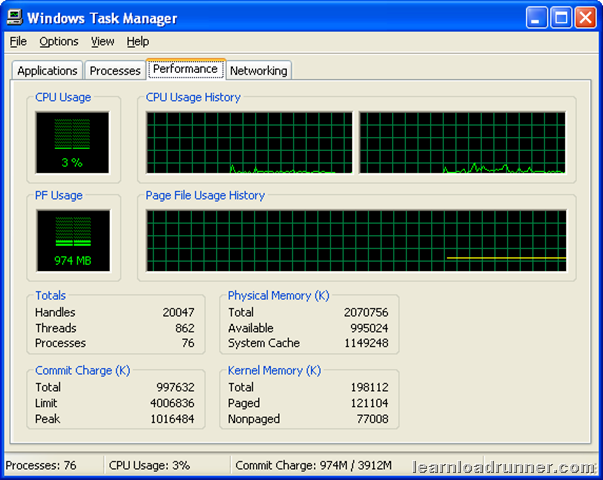
In terms of LoadRunner you should ensure that CPU usage should always be below (80-85)% on your loadgenerator machines for efficient functioning.
Memory usage:
It is the current working set of processes in kilobytes. In the above figure, Commit Charge (K) represents Memory usage. In terms of LoadRunner, you should ensure that Commit charge should always be less than Physical Memory (RAM) on your loadgenerator machines so that minimal paging is required.











 initiative